One of the things I like about AI is that is significantly lowers the barrier to entry if you want to try something out. The price, and one of the things that I really don’t like about AI is that you get robbed of some cognitive development. However there are times where the ends justify the means, and the first run of having your own analytics is one such place.
I did have Cloudflares analytics enabled but two things bugged me about that. One, I didn’t like that it was injected javascript. Two, it was hot garbage for what I wanted. It was the classic “red chair problem”1. I wanted analytics like a very basic version of Google Analytics but what I got was a paired back set of metrics orientated around contextual paint time and some path information. I could have used Google Analyics of course, but I’m already on Cloudflare and I’m mindful of 3rd party processors expansion. Trying out what was there felt like a good place to start, but ultimately it was not for me.
I went with an AI generated solution because I not that familiar with the patterns involved and I wanted a solution in place I could test. Here’s the first pass.
What is cool about this approach is that there is no JavaScript involved at all. It’s basically a plug that builds up attributes for 200 series responses from non-declared bots. For LiveViews there’s an on_mount hook but it all builds from this map:
## The IP isn't persisted and is used only to make the `visitor_hash`

    %{
      path: conn.request_path,
      referrer_host: referrer_host(conn),
      browser: ua.browser,
      os: ua.os,
      device_type: ua.device_type,
      country: conn.assigns[:visitor_country],
      visitor_hash: Analytics.visitor_hash(client_ip(conn), user_agent)
    }
This is all I’m really interested in. This data gets handed off into an Oban job for persisting so that the request isn’t block. It’s pretty neat and does exactly what I want. From this data I can work out sessions (visits) and pageviews and unique visitors. I’m not after exact numbers, just ballpark stuff so I can see get some idea of where to “sail the ship”.
I deployed it and switched it on.
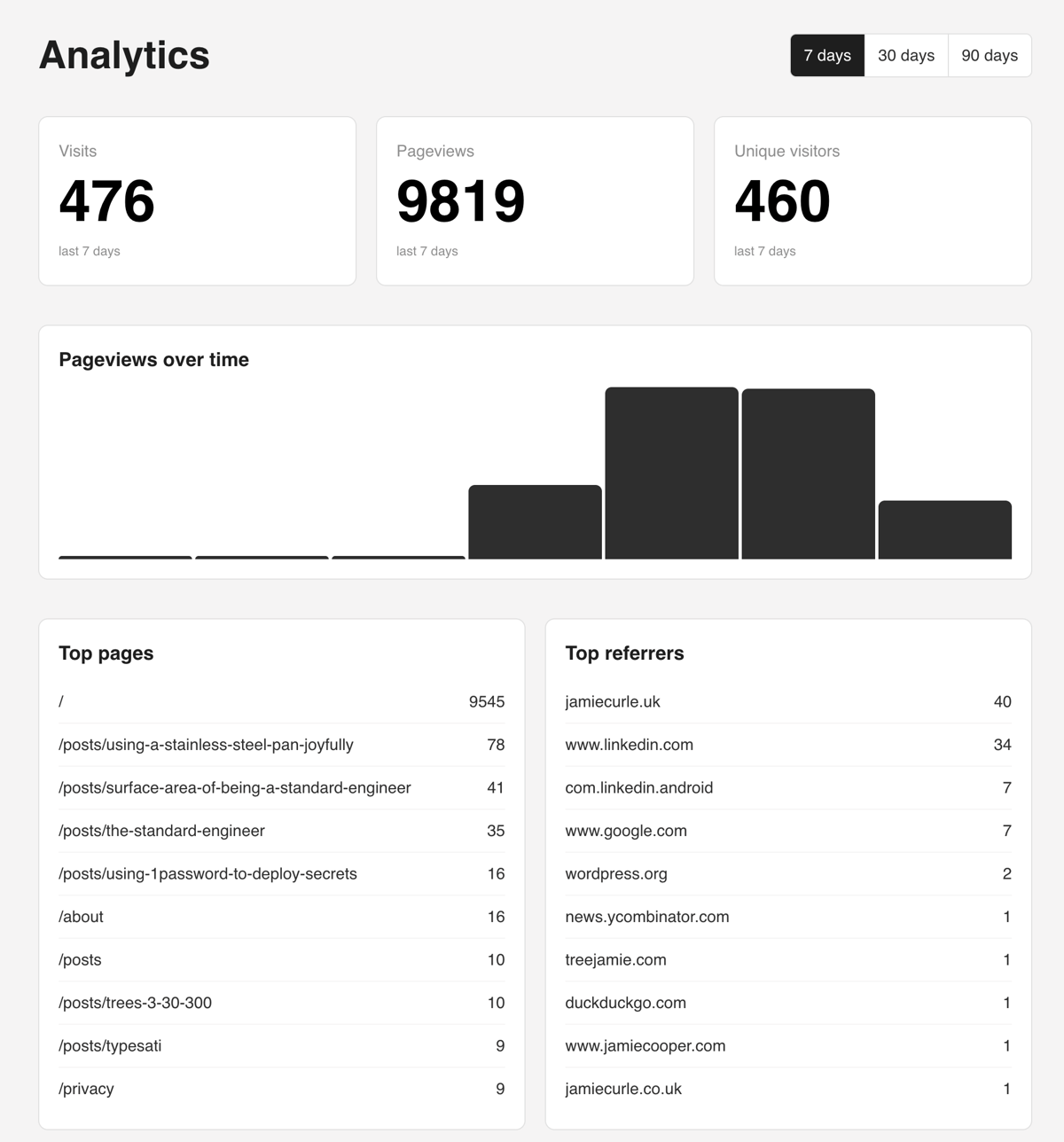
OMG: it’s full of crawlers and bots.
Twenty seconds after I deployed this code I noticed the database filling up with about 320 rows. I thought it was odd, because I know for a fact this place cannot be that popular yet. On inspection it was rows and rows and this kind of thing:

I immediately thought it was going to be easy to defend against so I made some changes on Cloudflare hoping it would stop and I also deleted the rows in the database. I thought that was solved; I was wrong - a romantic no-brain I was. Later on in the day, I noticed that many of the rows had the referer_host set to domains I had set up Cloudflare page rules on. Specifically to take traffic from the domains I own and direct it here. After consideration I concluded I’m fine with losing a few visits from the past to make the present more bearable.

Don’t count the homepage, cache it.
Anyway, it was time to get to the actual paid work so I figured I’d let it do it’s thing for a few days. Which I did. When I opened this up to do my usual early morning personal work time stuff today, I had an idea. What if I treated the homepage as “the street outside of the store”. Whilst it’s a poor analogy on the internet as few people land on homepages these days (it’s in-app browsers and referrers all the way down) I feel that the logic is sound. I’m not interested in any “/” traffic at all. In fact it’s a pretty good indicator of bot traffic as I have 9,543 rows of data showing this.
So I got to caching. Cloudflare started off as a CDN and caching is one of the things it does well, so made an amend to my homepage controller to send a suitable cache header and went over to Cloudflare to configure the cache. I don’t pay for Cloudflare and I’m basically piggybacking off their free tier so I don’t get fine tuned cache control settings. The nice targeted setting available to that would work with a Phoenix app wasn’t available for on their free plan (based cache of my header) so that made my edit moot. No big deal, I just used the less targeted but perfectly viable option of “ignore cache-control header and use this TTL”
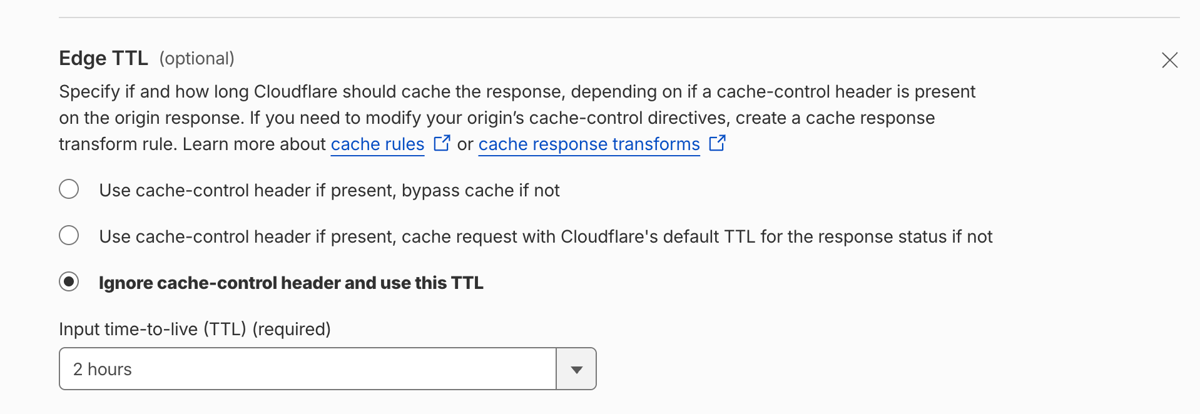
I deployed the rule and verified in curl (note, I’ve edited out a lot of lines). The first was a miss (obviously) the second was a hit: yay.
λ curl -I https://jamiecurle.com/
HTTP/2 200
date: Mon, 29 Jun 2026 08:07:38 GMT
cache-control: public, max-age=300
cf-cache-status: MISS

λ curl -I https://jamiecurle.com/
HTTP/2 200
date: Mon, 29 Jun 2026 08:07:41 GMT
cache-control: public, max-age=300
cf-cache-status: HIT 🥳
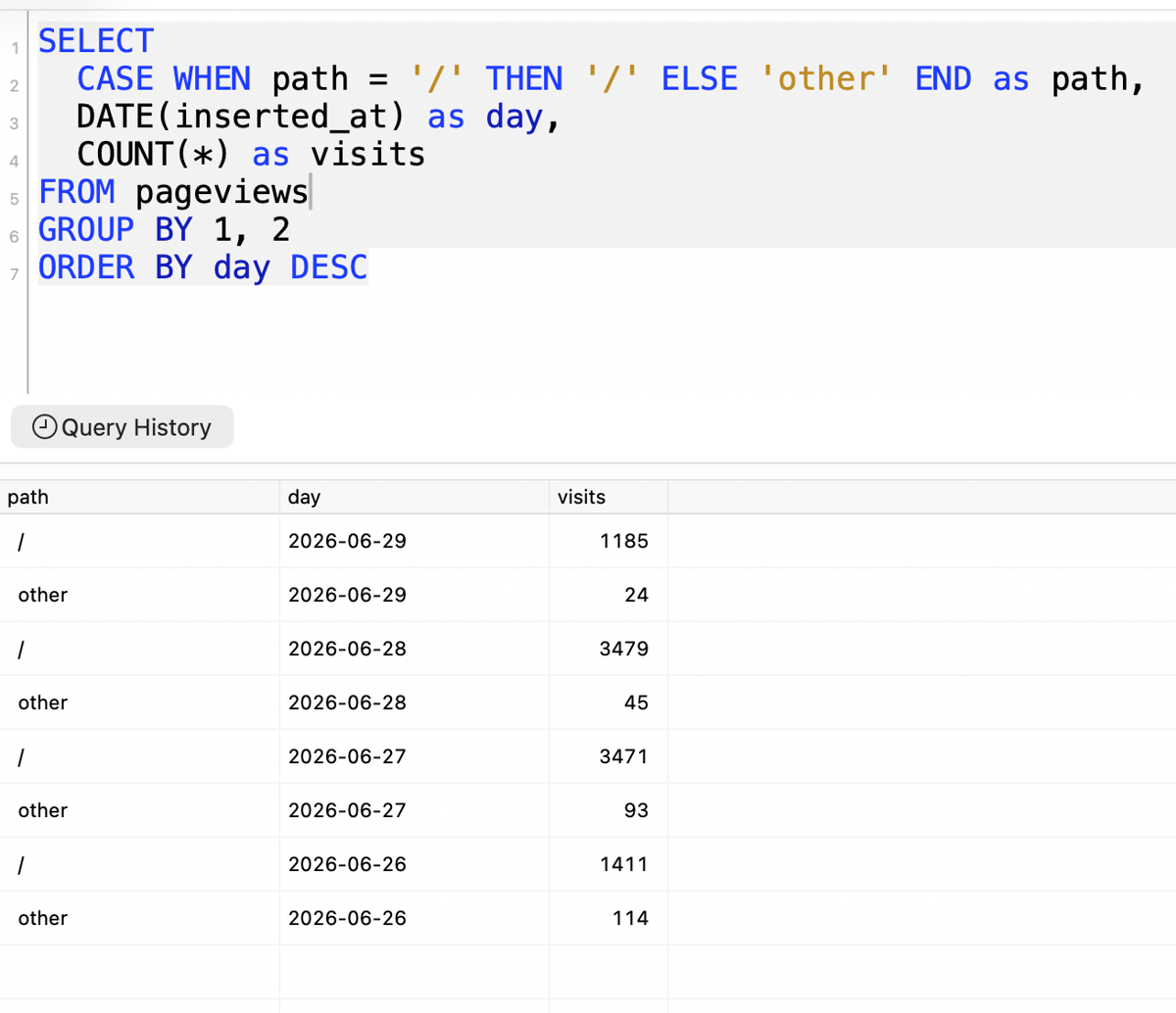
And the raw data shows less claptrap coming though from the time I deployed it. Nice.

Here’s a quick breakdown of how much junk I was collecting.
Cleanup
Removing the trash from the database is easy:
-- always, always open a transaction when you're in a database shell
BEGIN;

-- delete the pointless stuff
DELETE from pageviews where path = '/';
-- now go and inspect everything and ensure it is as you think it should be - yep, 9800 records gone.
-- looks good - 353 records remain.
COMMIT;
All that remains is to avoid saving any data when the path is “/”. Since this is a plug, that’s the obvious place to short circuit. Thankfully the LLM gave us a nice module attribute for this purpose but it did require a little refactor to the private defp skip_path? function. It was using String.starts_with?/2 to match strings. Using that logic my addition of “/” is essentially a wildcard as all paths start with “/”.
defmodule JamieWeb.Plugs.TrackPageview do
  # ...
  # Dynamic routes that go through the browser pipeline but aren't real
  # pageviews. (Static assets are served by Plug.Static before the router,
  # so they never reach this plug.)
  @skip_prefixes ["/office", "/dev", "/health", "/"]

  # but this no longer works...
  defp skip_path?(path), do: Enum.any?(@skip_prefixes, &String.starts_with?(path, &1))
end
So I need to use regex’s. Fine for my use case but you may revile in horror.
  @skip_prefixes [~r"/office/*", ~r"/dev/*", ~r"/health/*", ~r"/front-door/*", ~r"^/+$"]

  #...

  defp skip_path?(path), do: Enum.any?(@skip_prefixes, &Regex.match?(&1, path))
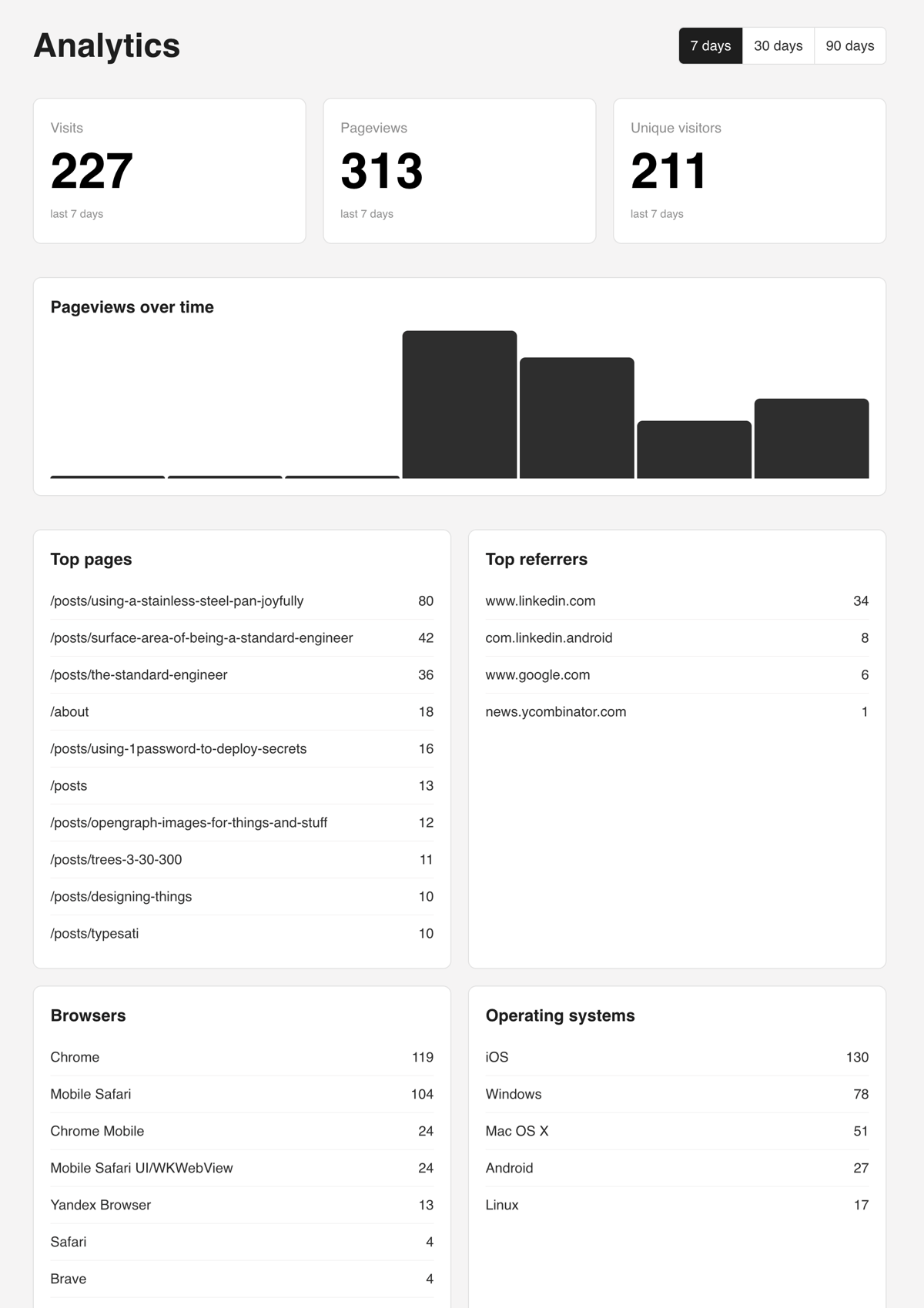
And one deploy later, we have a nice useful analytics engine I can use.
Eee, Lovely.
Does the job
This is a neat little analytics solution for me. It’s totally privacy respecting (I get zero personal data) and there’s no extra third party processor involved so it aligns nicely with privacy by design and by default. Regardless of how you feel about GDPR or data privacy legislation, “privacy by design and by default” should be the standard.
I’m going to let this run for a few months and see what it’s not giving me. But for now it does the job delightfully. When I come to revisit it, I will rewrite it by hand and claw back that cognitive development I outsourced to the LLM. Maybe that’s a new thing - cognitive debt?
One downside of the cache is that now I have to wait for posts to appear on my homepage! That’s no big deal though, I often end up editing posts long after they’ve gone live. This one had several major edits after I published it. My house, my rules!
-
The red chair problem is an armchair philosophy invention of mine. I’ll share it soon but I don’t think it is an original idea, but it was an organic thought of mine based on blog post I wrote many many years ago about two men on a mountain. ↩