TL;DR
I made an app to help me get better at touch typing and it’s called typesati. Download it, give it the permissions and then start a five minute session. Treat it like meditation and be mindful and deliberate in your typing. The aim isn’t to win, the aim is develop an awareness of your finger positions and how, perhaps, you allow haste to drive your typing rather than careful mindful action. The name comes from the Pāli: sati and the verb: type. It was also available as the domain name typesati.app.
Practicing touch typing
It’s 7:15am on the 4th of June. The trees that make up the urban public woodland1 that my house backs onto are alive with bird song and the smell of the damp woodland drying into the cool morning is sublime. The added smell of birch firewood drying is something will never tire of. The smell is heavenly. I find myself being entirely present in that experience. This wasn’t a random offshoot into some over elaborate attempt at prose. It was simply being present and grateful. The concept of being present comes into play in this post and specifically the operation of the typesati. Also, I’ve just finished my morning ritual of practicing typing and I’ve got a coffee in hand and I’m deciding what to do for the next hour and bit. I guess I’m writing a blog post.
I practice my typing for two reasons. One, I hope one day to think through my fingers as I’ve seen some of the engineers I’ve worked with do. Secondly, because I fear I’m in the crowd of people who are likely to get RSI through use of a keyboard. I want to get to using an ergonomic split keyboard before debilitating pain gets to me. To this end, I practice my typing every day using keybr.
Below is the keyboard I use in my practice and also when I’m writing very slow prose.
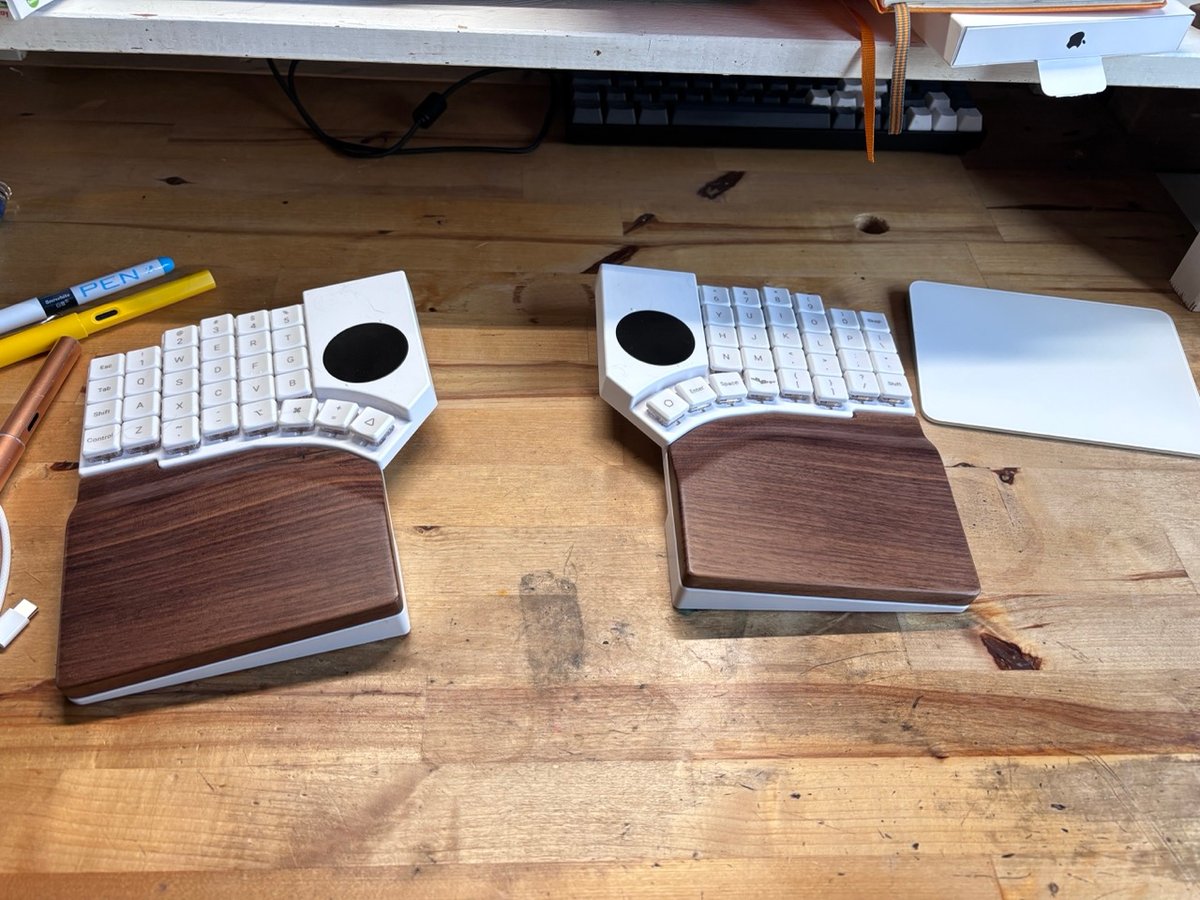
I cannot use it for writing code or mind-dumping blog posts (like this one) because I’ve not developed the mental models and mind to finger coordination to handle the punctuation associated with writing code, let alone the concept of layers. I’m still wrestling with being able to hit the right keys in the right place at the right time. Especially when I’ve been in my woodland1 for a few days using a chainsaw. There’s something about the vibrations that really screws with my coordination for a day or two. But I’m not giving the tools up because I like my life split between treeworld and techworld and there’s a lot left to do in the woodland. I digress.
Learning
I have a hunch that touch typing is a lot like driving different vehicles. Consider a big tractor, a Ford Ranger and a small car like a Toyota Aygo. I’m comfortable driving all three of them but each is a very different driving experience (tractors being the most fun and useful vehicles for working in woodlands2). However, when you get used to the specifics of driving each of them, the generics of driving all of them are revealed. Then one day you find out that you can drive pretty much anything and that it all feels the same. I’m hoping the same is true for learning to type on a columnar keyboard like the Go60 and the non-columnar Keycron K2, that I’m writing this post on this morning. Maybe it will also open up Dvorak and Colemak.
The Problem
Back to typing. The problem is that I practice on the Go60 and I work on the Keycron K2. As devices they are as dissimilar as a tractor and a small car. There is a gap between my practice and work and I’ve not had enough experience for the generics to fully reveal themselves. I practice for ten minutes at most per day but I work for anywhere up to 600 minutes. Whilst the ten minutes of deliberate practice is transformative in some meaningful small way, the surface area of that larger chunk of time cannot be denied as the more useful period to insert influence.
I grew up in the 1970’s and 1980’s. The school I was in had maybe one room with fifteen computers for over one thousands students. There was one archimedes computer in the design lab. I used that for maybe ten minutes once a week. The reality was though, that I didn’t touch a keyboard for any meaningful period until the late 1990’s when I started making websites. By that point I was to all intents and purposes, an adult. The squishy neuroplasticity of childhood and adolescence had all gone and I had an adult mind where the acquisition of new skills is harder every year.
To add insult to injury, in that period I was also not around anyone who could touch type. Everyone was a hunt and pecker. I’m primarily a visual learner3 and that meant I had no one to fast track learning from. I didn’t even know touch typing was a thing until I saw someone do it whilst writing code. My mind was blown. I had no idea the bumps on f and j where there for a reason.
Finally, around 2010 I learned to use VIM. That placed my fingers incorrectly on hjkl rather than jkl;
The typing style I was left with resembled touch typing, but it wasn’t. It was chaos typing in which smashing backspace multiple times was a key feature. Rapid type, lots of errors that were all fixed with rapid backspaces. It sounds like touch typing, but in reality it is just frustration mixed in with a desire to avoid the hard job of re-programming myself. When I returned to tech at the start of 2025, I made a commitment to tackle all of my engineering short-comings and transform myself into the kind of engineer that I’d always admired. Hence the typing practice.
So a few days ago whilst I was writing another post my designer mind went into action and started thinking “what if…”
Claude makes it possible
Vibecoding gets a bad rap and in some cases it’s justified. In others, not so much. I never learned Swift in anger. I did a teeny bit of objective-c many years ago, but never went anywhere. Mac apps and the environment of the operating system as an engineering context are new to me. But they are not new to the LLM’s.
I knew what I wanted and so I set to work. I wanted an process that captured keystrokes over the entire operating system and split them into two groups backspace presses and not backspace presses. This blunt division is intentional, I’m not building a keylogger. One of the privacy by design and by default principles is to minimise data capture to what is necessary for achieving the outcome. Also my infosec background and seven years spent doing corporate security assessments caused me to think very, very hard to ensure the key capturing could not be used maliciously.
So yes, Claude wrote all the code and I went over it with my engineering mind. I’ll spare you the file by file analysis but Keycodes.swift was the important file and I wanted to make sure it really was capturing backspace and other.
import Foundation
import CoreGraphics

/// Hardware-independent virtual keycodes (Carbon `kVK_*`) we care about by name.
///
/// The numbers come from `<HIToolbox/Events.h>` and are stable across keyboard layouts.
enum Keycode {
    /// `kVK_Delete` — the key labelled "delete"/"backspace" on Mac keyboards.
    static let backspace: Int64 = 51
}

/// The only distinction we ever persist: was a press backspace, or anything else?
///
/// This is the privacy boundary. We classify a raw keycode into a `KeyKind` at the
/// moment we receive it and then throw the keycode away — so nothing downstream
/// (in memory or on disk) ever knows *which* key was pressed, only backspace-vs-not.
/// That's what keeps the database from being a usable record of what was typed.
enum KeyKind: String {
    case backspace
    case other

    init(keycode: Int64) {
        self = keycode == Keycode.backspace ? .backspace : .other
    }

    /// Whether this press should be dropped entirely — neither counted nor allowed to
    /// break the current streak.
    ///
    /// Option/Command + Backspace delete a whole word or line, not a single mistyped
    /// character. We treat those as navigation rather than a correction, so they don't
    /// inflate the backspace count or end a streak the way a real backspace does.
    func isModifiedBackspace(flags: CGEventFlags) -> Bool {
        self == .backspace && (flags.contains(.maskAlternate) || flags.contains(.maskCommand))
    }
}
The code for typesati is public and licensed under BSL 1.1, so you’re welcome to go and peruse it yourself and poke it with sticks for personal and internal business use. The data is logged into a SQLite database, so that you’re free to open up and inspect the data for yourself. The data is used to develop stats about how you are typing in that session. The data is yours, it stays on your machine and there’s zero telemetry or AI. Remember, privacy by design and by default.
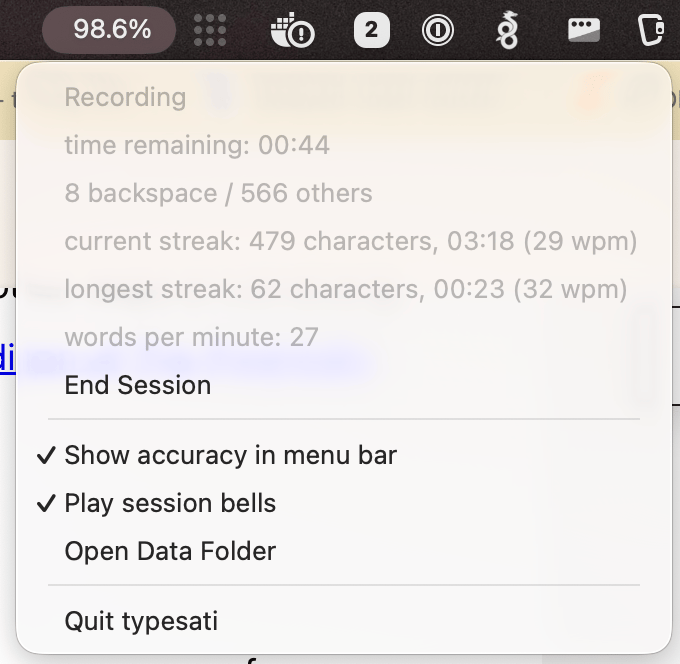
Here’s the key element though. As you’re working through the day, you can “start” a session just like you would “start” meditating. You can start a freeform session that runs for however long you want, or a five minute session. Personally, I’d go with the five minute session as it closes the session off automatically after five minutes. There’s even a bell to make it more meditation like.
However, instead of this being formal practice, where the goal is the practice, when you start a typesati session, you’re engaging in deliberate practice. The goal of which is to operate in a task whilst being mindful about your typing. Data is persisted to the local SQLite database as you type. The data stays on your machine and doesn’t go anywhere. There’s no constant logging of keystrokes. That would be awful and pointless. You don’t consider a day at work meditating just because you meditated in the morning. But you may choose to meditate for a few minutes between the transitions between tasks. Same deal with typesati. If you feel yourself getting sloppy, start a session. Be mindful and deliberate. If you want rid of the data, open up the data folder and delete it. Gone. Like it never existed. If you’re suspicious of what is being captured, inspect it or the source code
The key elements to concentrate on are accuracy, streaks and words per minute. I know from over a few decades of playing drums that if you can play accurate when playing slow, you can play very accurate when playing fast. The reverse is not true.
Accuracy
This is the most important metric by far and hence it’s the one that is visible at all times. Backspace presses are counted as negatives and everything is counted as positives. option + backspace (os shortcut for delete word) doesn’t count against you and neither does cmd + backspace (delete sentence). The way to use the app is to start a session, be mindful in your typing and keep an eye on the accuracy. Sessions can last as long as you want, but aim for around 3-5 minutes.
Streaks
In meditation there’s a practice in which you lay your attention on your breathing and count from one to ten. Staying present on the breath you increment on each exhale/inhale. If you forget what number you are on, then you go back to one. If you get to ten, you go back to one. The aim is not to get to ten, the aim is to be aware of where you are at. This is streaks. The aim isn’t to get as long a streak as possible. The aim is to develop the ability to not press backspace and to incorporate other ways of correcting errors. This approach was endorsed in the 20th anniversary edition of The Pragmatic Programmer.
WPM
Obviously the end goal is to get to 100+ words per minute with an accuracy of over 99.99%. However, this is a journey and when you’re re-programming forty-plus years of bad habits, it isn’t a good metric to focus on unless you enjoy clubbing yourself over the head and into a doom cycle. As you can see from the above post, I am currently hovering around the 30 words per minute mark at an accuracy of 94.5%.
Backend
I do plan on building out a backend service for a small fee on the web. Its purpose is to drive you to maintain a dedicated practice with a 1% improvement each week. Mostly with gentle nudges via email, or push notifications (off by default because attention is precious). Future updates to the app will allow you to do that if you want to. But if you never want any of that, then you’ll never be bugged about it.
Why make it?
The reason I made the app was simple. To cultivate a deliberate practice in typing when I’m outside of my formal practice windows. Also, now that LLM’s are so good at writing code, it makes experiments like this possible. I’ve been using it for two days and I’m already noticing my hands, tendons and muscles adapting to a less chaotic way of typing. I feel adaptation and not pain. I know the difference it feels like [DOMS4 in my hand. It is early days, but I’d say it’s working.
Inevitable permission grant
Because the app monitors keystrokes, it requires that you give explicit permission to do so. There’s no getting around that.
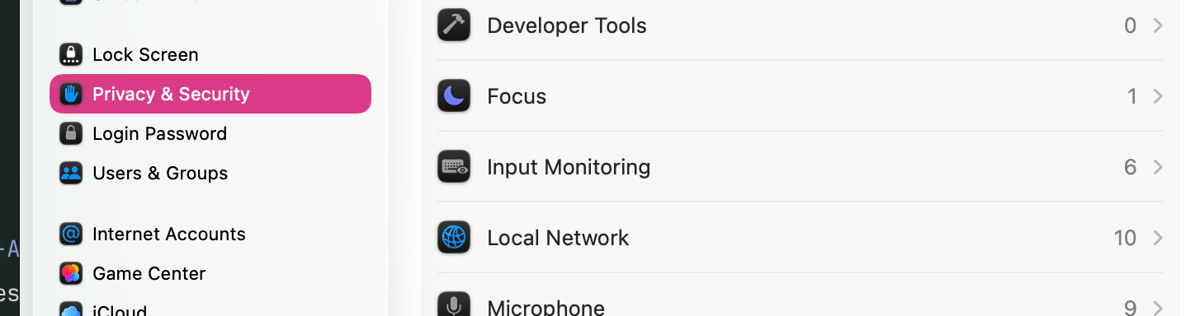
However, I did stump up the fee and the time for an actual apple developer account. You can install it without any Gatekeeper warnings about all of the horrible things that may happen if you install unsigned software onto your mac.
It is free as in beer.
Because typesati uses the same mechanisms as a keylogger would, it isn’t allowed in the app store. So it has to be downloaded directly from its website.
It is free now and it will be free always. The source code is at github.com/jamiecurle-ltd/typesati and you can also put any issues there.
There will be a paid for web connector to the app that is there to assist you in practice, but that’s one for later. I just wanted to get this out the door. And yes, the product site was also a vibe-coded slop dump if you want to frown on such things. To me, it just gets it out the door.
The real work starts now :) Thanks for reading, I appreciate your attention.
Cheers,
Jamie.
-
There are two woodlands in my life. One behind my house which I have the pleasure of looking out into. It is an urban woodland accessible to the general population. Most enjoy it, some vandalise it and set it on fire. Usual stuff. The other is a woodland that I manage and own out in Northumberland. ↩ ↩2
-
Being very conscious of the time of year and where you are using them, so you don’t destroy the ground flora and soil. ↩
-
Learning styles have largely been dismissed by the teaching profession but I think they’re useful. They’re the fast track way to learn for someone. The knack is not giving into only allowing someone to learn through their fast track and occasionally to “tie the strong hand behind the back” so that weaknesses can be developed. ↩